HOW TO DESIGN WEBSITE
"Make Website using NVU - Website Creator.."
Add and REMOVE LINKs
You see the link menu in the template sidebar we have download. I don't need about us and news. So I decide to delete that menu and replace them with download. What I need to do is place the cursor on the menu and delete it, and type another menu I like. Which in case I prefer 'download' menu.
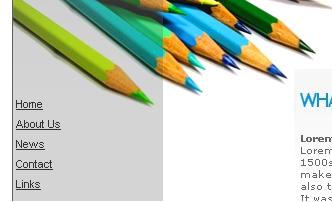
all the menu link in the template, link out to nowhere. Now you need to link these link menu to correct place.
Remember you need to have another html file first before you go through these steps, except you want to link to external page. Click this to learn about creating another html web page
Place the cursor in the menu you want to link(ex:download), then click 'link' toolbar.

A window will show up, click icon  ,
select file html in the same folder with index.html. In this case, I
select download.html. If you want to link to another website you can do
this by type in website address (don't forget to use http://) on the
link location form.
,
select file html in the same folder with index.html. In this case, I
select download.html. If you want to link to another website you can do
this by type in website address (don't forget to use http://) on the
link location form.
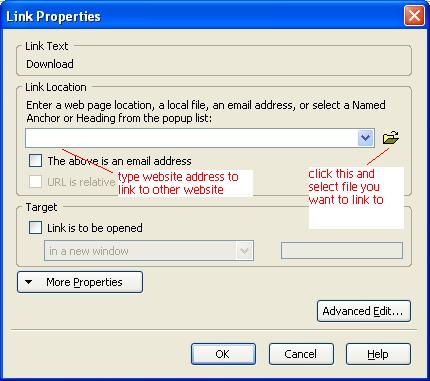
This tutorial works not only for menu links but works for all the content too
Donate: If you use this site regularly and would like to help keep the site on the Internet, please consider donating a small sum to help pay for the hosting and bandwidth bill. There is no minimum donation, any sum is appreciated - click button below to donate using PayPal. Thank you for your support.